Agent Reach: give your AI agent access to the internet
A free, open-source tool that lets AI agents like Claude Code read and search YouTube, Twitter/X, Reddit, GitHub and any web page — with a single install command.
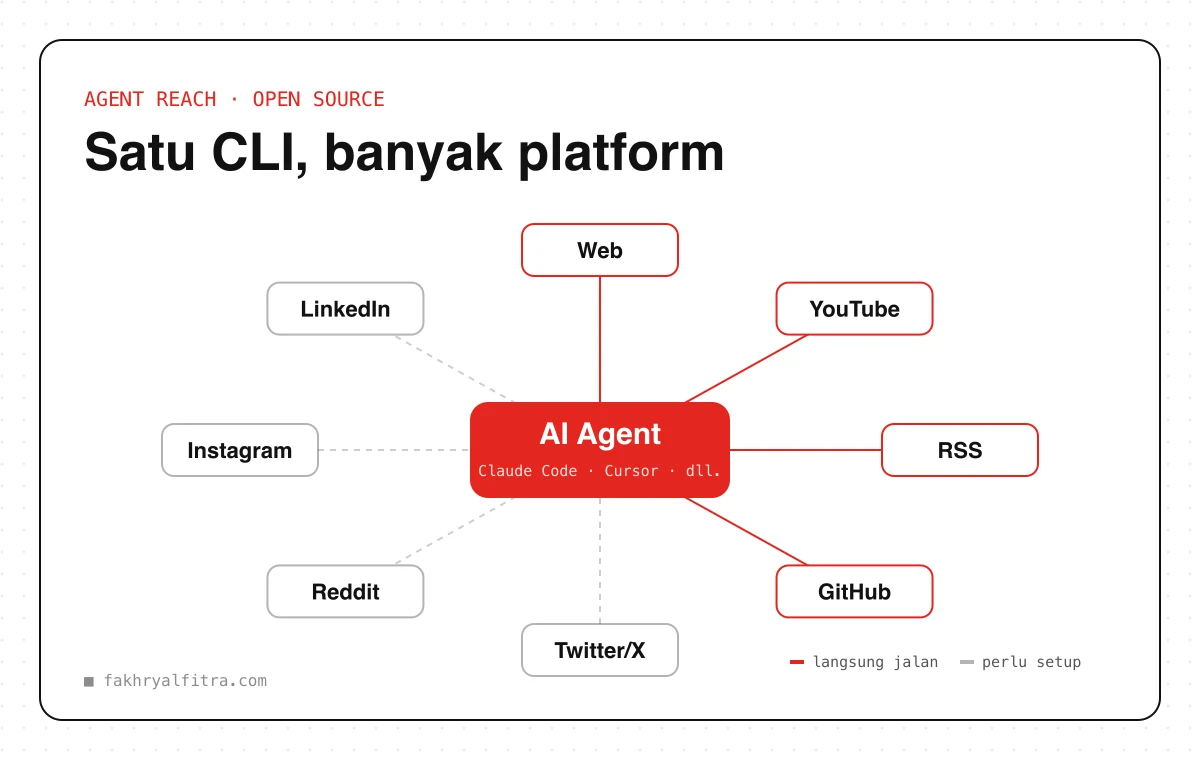
AI agents like Claude Code, Cursor or OpenClaw are already great at writing code and managing files. But ask them to “check what people say on Reddit” or “summarise this YouTube video” and they often hit a wall: paid APIs, blocks, or logins.
Agent Reach fixes that. This open-source tool (MIT licence) installs and configures access paths to many platforms at once — your agent just uses them. All its tools are free, and any cookies or logins you connect stay on your own computer.
Works out of the box
- Read any web page in a clean format
- YouTube transcripts and video search
- Read RSS feeds
- Read and search public GitHub repositories
With a little setup
- Twitter/X — search tweets and read timelines
- Reddit — search and read discussions
- Instagram and LinkedIn — public profiles and pages
- Semantic web search, plus more platforms over time
How to install (easiest)
Copy this line to your AI agent, e.g. Claude Code, and let it do the rest:
Install Agent Reach: https://raw.githubusercontent.com/Panniantong/agent-reach/main/docs/install.md
Or install it manually in the Terminal (requires Python 3.10+):
pip install https://github.com/Panniantong/agent-reach/archive/main.zip
agent-reach install --env=auto
To check which platforms are working and how to fix the rest:
agent-reach doctor
Install it as a Skill
To call it directly with /agent-reach in Claude Code (or any agent that supports Skills), also install the skill:
npx skills add Panniantong/Agent-Reach@agent-reach
Example
Start your prompt with /agent-reach so the agent uses the Agent Reach skill right away:
/agent-reach Find discussions on Reddit and Twitter/X about [PRODUCT / TOPIC] from the past month.

Summarise:
1. What people like most
2. The most common complaints
3. Three content ideas I could make from these findings

Include a source link for every point.
Use it for research and learning, not spam. Follow each platform's rules, and only connect accounts that are your own.